For couples who share money
Shared money.
Separate lives.
Isomoira keeps an honest, running picture of what you and your partner share — and lets each of you decide, account by account, exactly how much the other one sees.
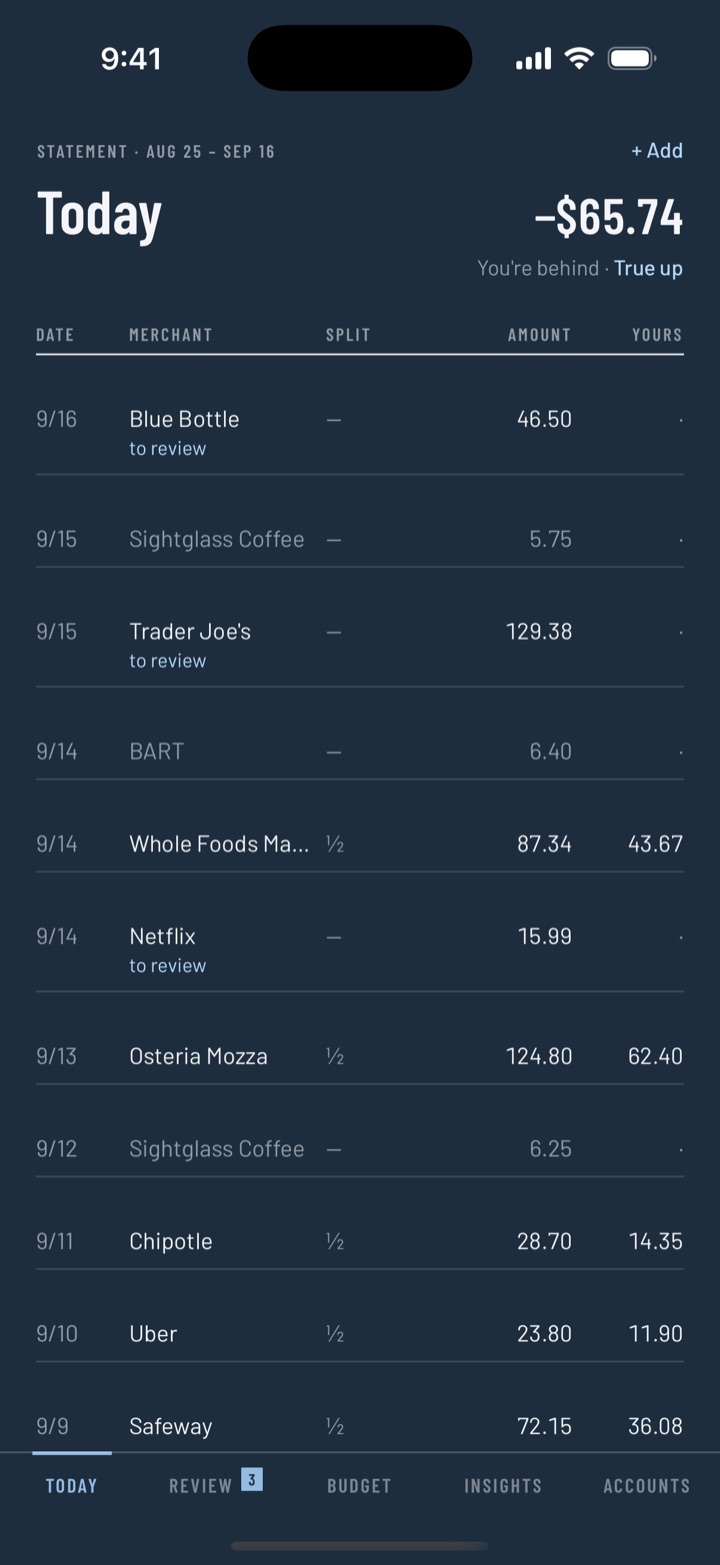
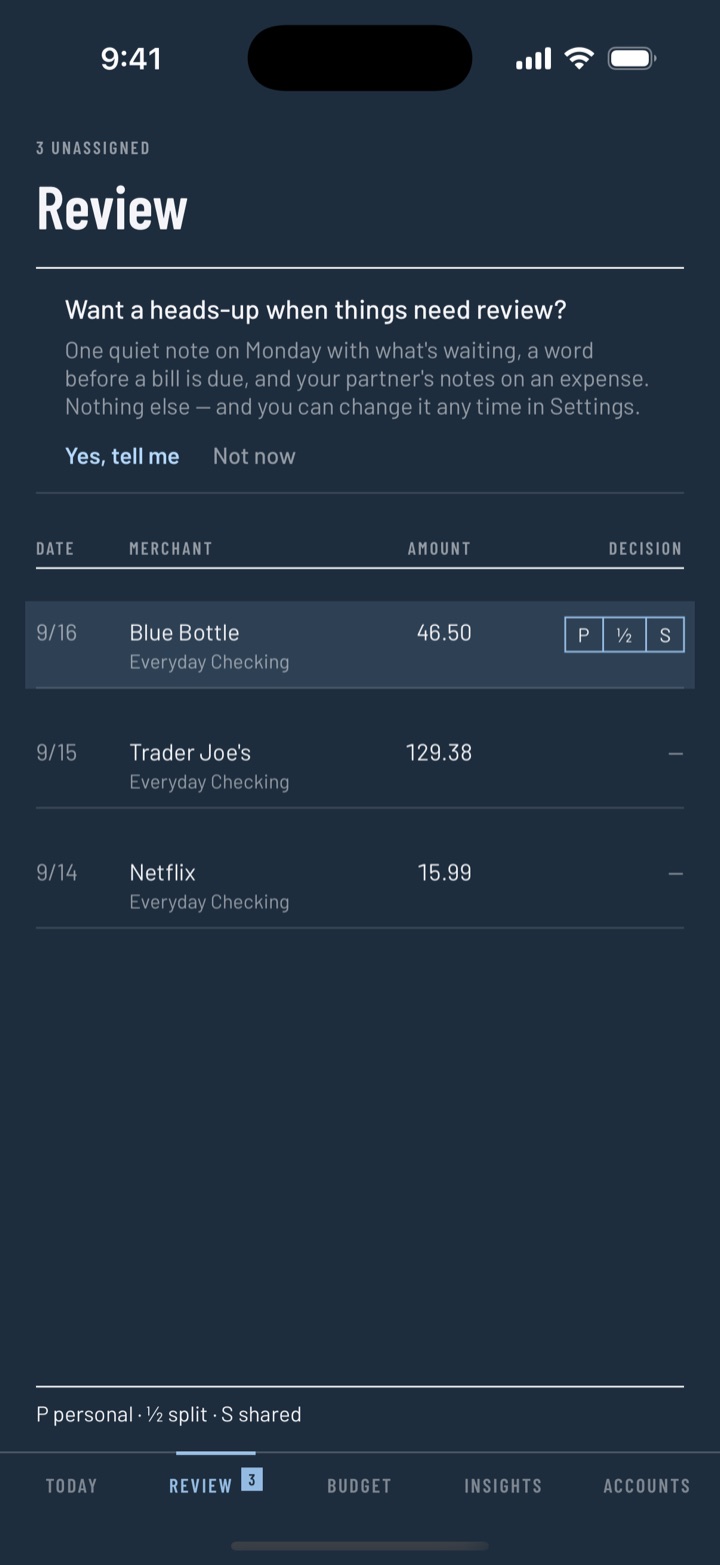
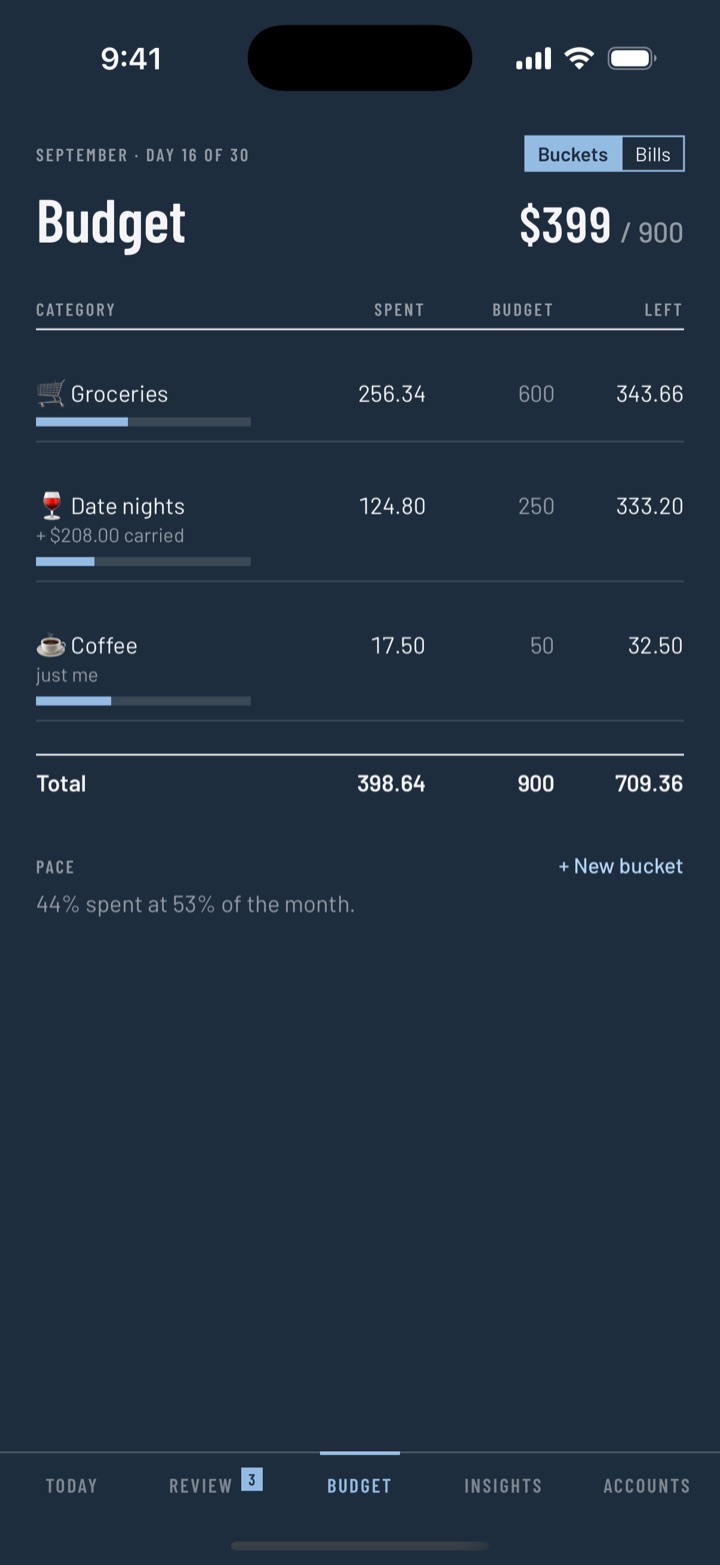
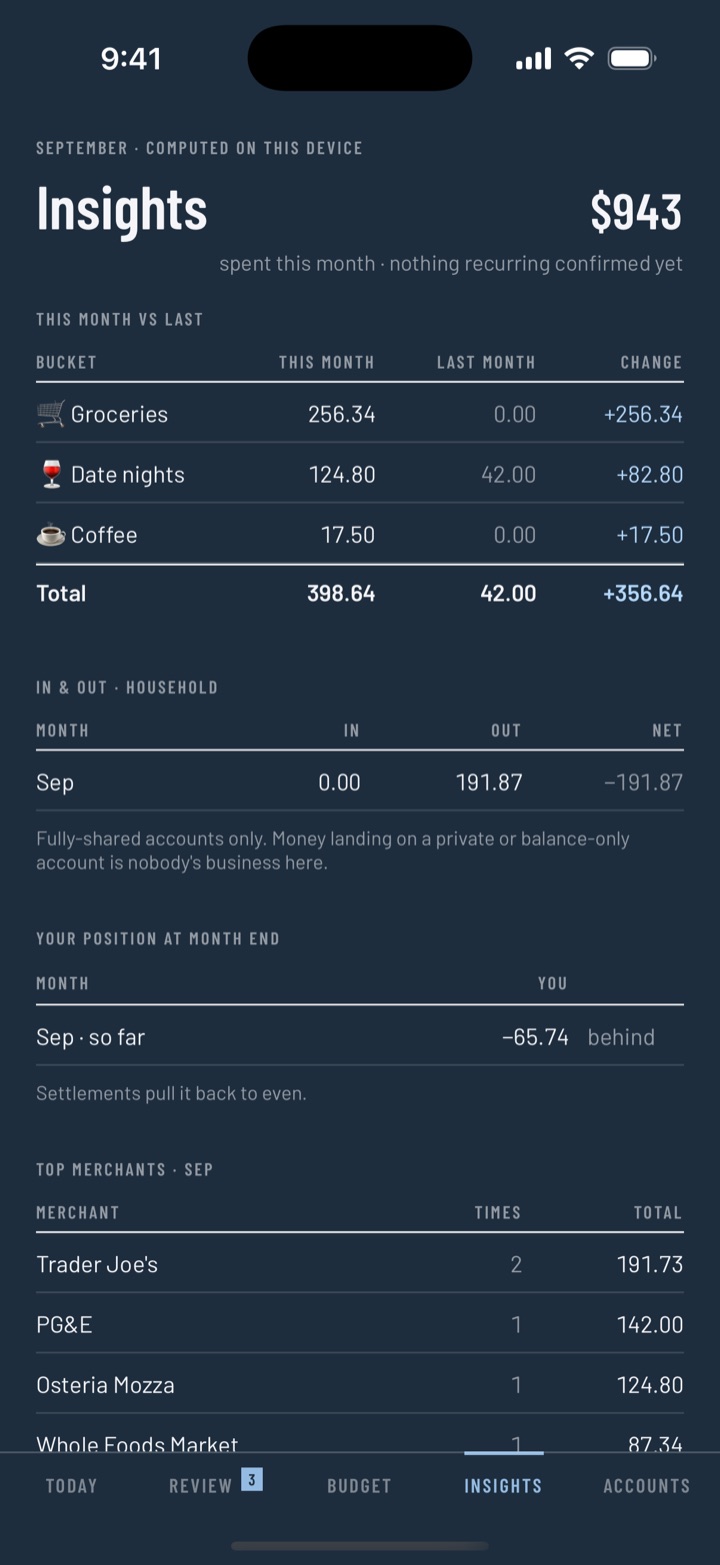
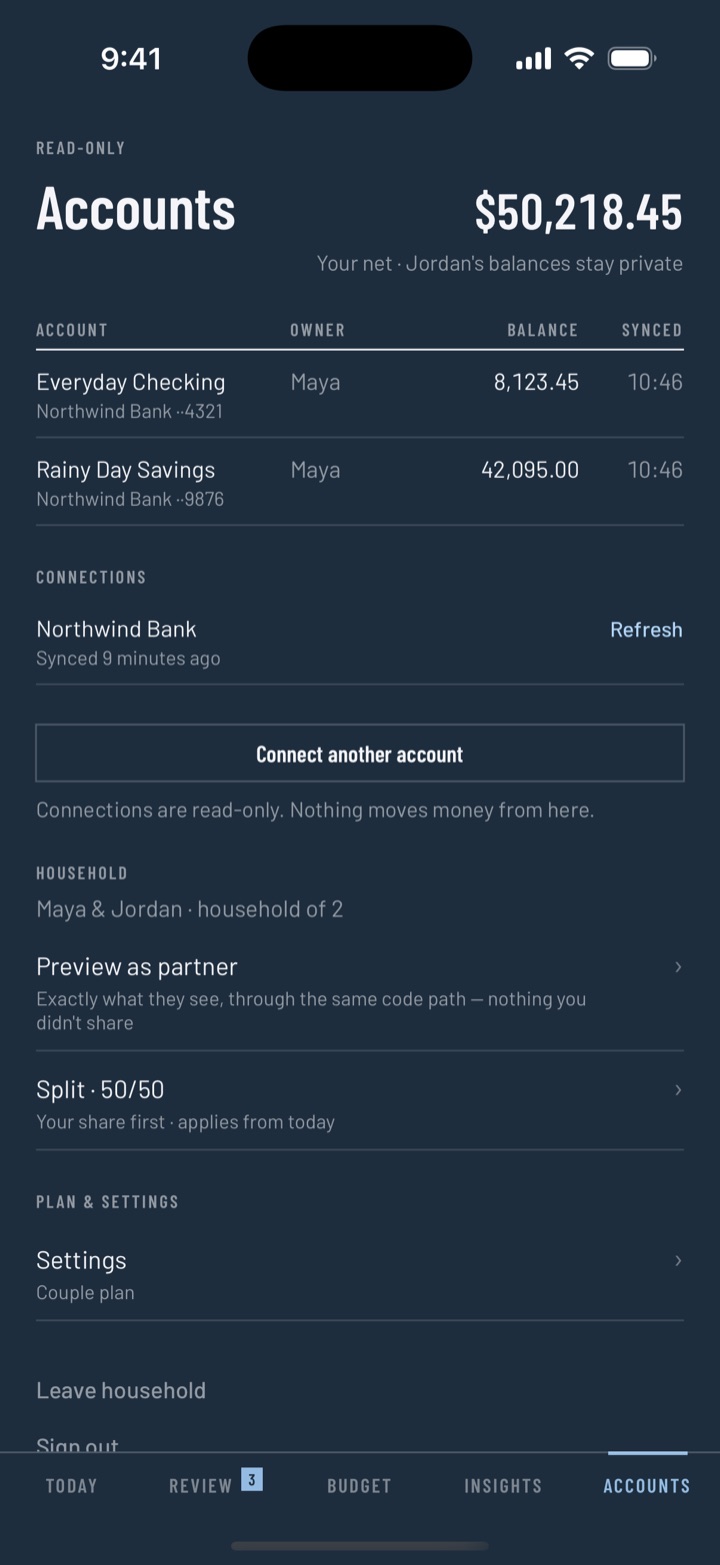
Real screens from the app, demo data. Swipe, or pick a tab.
The membrane
Three tiers, per account.
You pick each one.
Sharing a household budget shouldn't mean handing over your statement. Every account you add carries its own tier, and you can change it whenever you like.
Every line, both ways
Transactions and balance. The tier for a joint checking account, where nothing was ever private anyway.
The number, not the list
They see what you have, not what you bought. Your own card, still counted in the household picture.
Invisible, still yours
Your partner never sees it. It still feeds your own budgets, so your safe-to-spend stays true.
Preview as partner shows you the app exactly as they see it — before you commit to a tier.
Built in, not buriedThe ledger
It keeps score so neither of you has to.
Every shared expense accrues to one running balance. No reminders, no chasing, no monthly reckoning you both dread.
01 — DECIDE
Shared, personal, or split
Review is a table, one row at a time: personal, half, or shared. A second Trader Joe's run offers “same as above”, and you get five seconds to take a decision back. Rules you can both see handle the ones that never change.
02 — ACCRUE
Any ratio you agreed on
Fifty-fifty, seventy-thirty, or a fixed amount off the top. Every row states its split and has a Yours column, so what you carry is never a sum you do in your head.
03 — TRUE UP
One number, when it matters
The True up link only appears once the balance is worth settling. Send a payment link or mark it settled — the statement starts again from even.
No nagging. No red numbers. No one is the household accountant.
Isomoira never asks anyone to pay up. Notifications stay off until you turn them on, and the list is short: one quiet note on Monday, a word before a bill lands, your partner's notes on an expense, and news about your own subscription. The Monday note reports and never asks — a quiet week sends nothing. Over-budget shows up as a word, not a color. Nothing in the app is designed to make either of you feel caught.
What's in it
The whole household, on both devices.
Review, as a table
Personal, half, or shared — one row at a time, about a minute a week.
Splits, any ratio
Percentages or a fixed slice, per expense or as your default.
Rules you both see
Standing agreements — Costco is always shared. Either of you can switch one off.
Buckets that carry
Underspend rolls forward, overspend starts the month clean, and the annual bill is set aside a month at a time.
Bills and subscriptions
Found in your own history, annualized, with a word when a price goes up.
Safe to spend
One number, with the arithmetic behind it one tap away.
Insights
This month against last, in and out, top merchants, the out of the ordinary — small ruled tables, worked out on your device.
Interest and debt
What a balance costs you in dollars and in time. It never leaves your device.
Notes on an expense
A sentence beside a number. No reactions, no read receipts — a note, not a chat.
True-up links
Send a payment link with your Venmo or Cash App handle, or record that you settled in cash.
Bank statement import
No connection needed: the CSV your bank already gives you, read on your device.
iPhone, iPad, widget
One app laid out properly for both, light and dark. Safe to spend, or where you stand, on your home screen.
Pricing
Manual is free. Automatic is a subscription.
One subscription covers the household — one bill for the two of you, never per seat.
Manual
FreeComplete, not a trial. You add expenses yourself; everything else works exactly the same.
- Review, splits and the ledger
- Included
- Buckets and safe to spend
- Included
- True up and payment links
- Included
- Bills, rules, insights and notes
- Included
- Bank statement (CSV) import
- Included
- Both of you, both devices
- Included
Automatic
30 days freeConnect a bank and transactions arrive on their own. Solo covers one of you connecting; Couple covers you both.
- Solo
- $5.99/mo · $49.99/yr
- Couple
- $9.99/mo · $89.99/yr
- Everything in Manual
- Included
- Read-only bank connections
- Included
- Billed by Apple, cancel anytime
- Yes
US prices. The first 30 days are free, and Couple is one bill for the household — never per seat.
Who it's for
Two incomes, one household, separate accounts.
Isomoira was built for couples who share the costs without merging their lives — and who'd rather the money conversation got shorter.
- You split rent and groceries, but you each keep your own accounts.
- One of you earns more, so you split proportionally — not down the middle.
- You have a joint account and still end up owing each other anyway.
- One of you tracks everything and the other one would rather not think about it.
- Not for you if you want streaks, badges, or a wall of pie charts. The insights here are small ruled tables.
Security
Private by construction.
Sign in with Apple
No passwords to store, and no email to hand over if you don't want to.
Read-only connections
Bank access can read transactions and never move money. Tokens stay server-side, never in the app.
Pinned connections
Certificate pinning on every request the app makes.
Lock and shield
Optional Face ID on open, and the app blanks its own preview in the switcher.
Leaving is clean
Export everything, leave a household, or delete your account — and the copy goes with it.
Nothing to record
Screen recordings, AirPlay and a mirrored display get the wordmark, not your numbers.
The whole threat model is published, in plain words, at isomoira.com/security: what we hold, who might want it, what stands in their way, and where the limits are.
Questions
Fair enough.
Do we both have to pay?
No. One Couple subscription covers the household: if your partner holds it, you connect a bank under their plan — one bill, never per seat. Solo is there for when only one of you connects.
Can my partner see my private spending?
Only what the tier on that account allows. Set an account to Just me and it never leaves your device's view — while still counting toward your own budgets.
Is manual mode a crippled demo?
No. Review, splits, buckets, bills, rules, insights, the ledger and true-up all work, and you can import the CSV your bank already gives you. The subscription buys automatic bank sync, not the features.
What happens if we break up?
Either of you can leave the household. You keep your own history, the shared ledger closes out, and neither of you needs the other's permission.
Will it nag us to settle up?
Never. No notification ever asks anyone to pay. If you turn them on, Monday's note says where things stand, once — and a quiet week sends nothing. The True up link doesn't even appear until the balance reaches twenty dollars.
Android?
Not yet — iPhone and iPad first. The waitlist is the best way to hear when that changes.
Be there when it opens.
Waitlist members get the first TestFlight invitations, and one note when it opens.